
Timesheet Logs Application
Overview
The Timesheet Logs Application is a Power Apps–based solution designed to help organizations accurately track employee working hours against assigned projects on a weekly basis. The application allows employees to log daily hours with task descriptions, while administrators manage projects and project-user assignments centrally.
The app is built using Microsoft Dataverse as the backend, ensuring secure, scalable, and structured data management. It improves transparency, accountability, and efficiency in time tracking across multiple projects.
Features of the Application
Daily & Weekly Time Logging
- Employees can log hours for each day (Monday to Sunday).
- Hours are entered project-wise with task descriptions.
- Weekly view ensures accurate tracking without duplicate entries.
Project-Based Time Tracking
- Employees can log time only for projects assigned to them.
- Each time entry is mapped to:
- Employee
- Project
- Day
- Date
- Week Start
- Hours
- Description
Dynamic Week Selection
Initial Data Load
- A week selector allows users to choose:
- Previous 3 weeks
- Current week
- Upcoming 3 weeks
- Week ranges are displayed in Monday–Sunday format (e.g., 05/01/2026 to 11/01/2026).
Admin Project Management
-
Admin users can:
- Create and manage projects
- Assign project managers
- Define project duration
- Mark projects as billable or non-billable
- Enable or disable projects
User-to-Project Assignment
- Admins can assign users to projects with specific roles.
- Only assigned projects appear in the employee timesheet screen.
Application Screens
The Timesheet Logs Application consists of three primary screens:
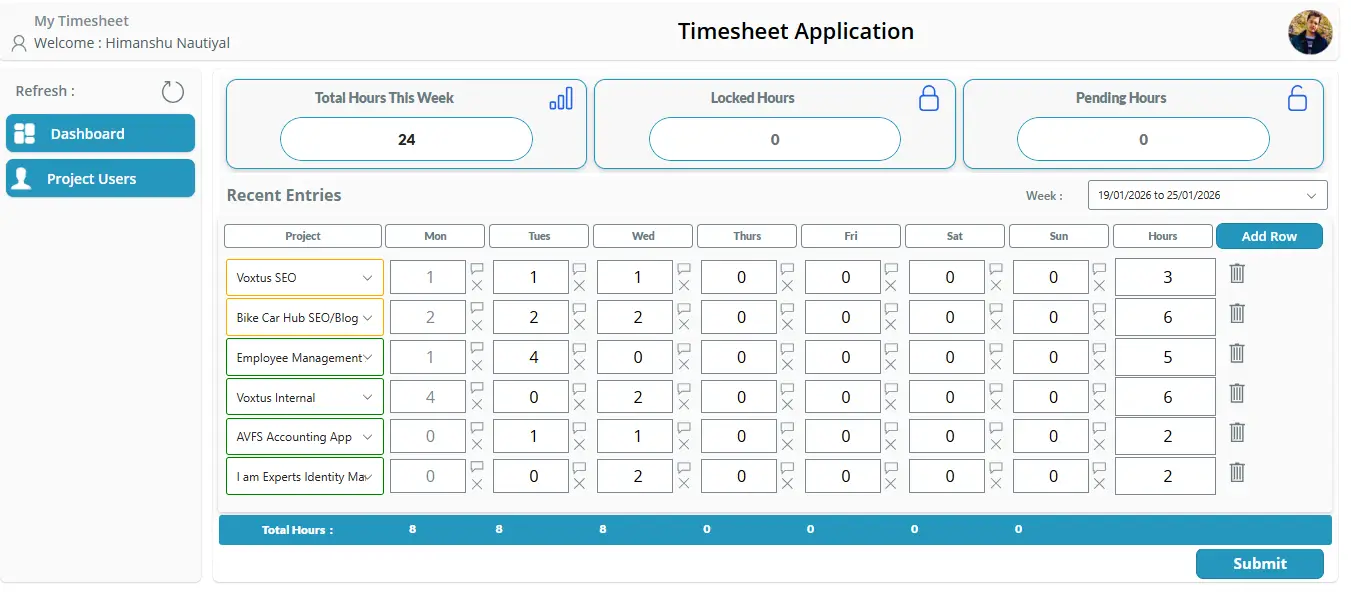
1. Dashboard Screen (Timesheet Screen)
The Dashboard Screen is the main working area for employees, where they log their daily working hours.
Key Components
-
Week Selector (Combo Box)
- Allows selection of weekly date ranges (Mon–Sun).
-
Project Selection
- Employees select from only assigned projects.
- Daily Hour Inputs
- Monday
- Tuesday
- Wednesday
- Thursday
- Friday
- Saturday
- Sunday
- Description Popup
- Each day has a description icon.
- Clicking the icon opens a popup to enter task details.
- Descriptions are stored separately per day and per project.
- Total Hours Calculation
- Automatically calculates total weekly hours per row.
- Add / Delete Rows
- Add multiple projects per week.
- Delete individual rows if required.
Working Logic
- If data exists for the selected week, it is loaded automatically.
- If no data exists, a blank row is shown for fresh entry.
- On submit:
- Existing records are updated
- New entries are created only when needed
- Duplicate records are prevented.
2. Project Users Screen
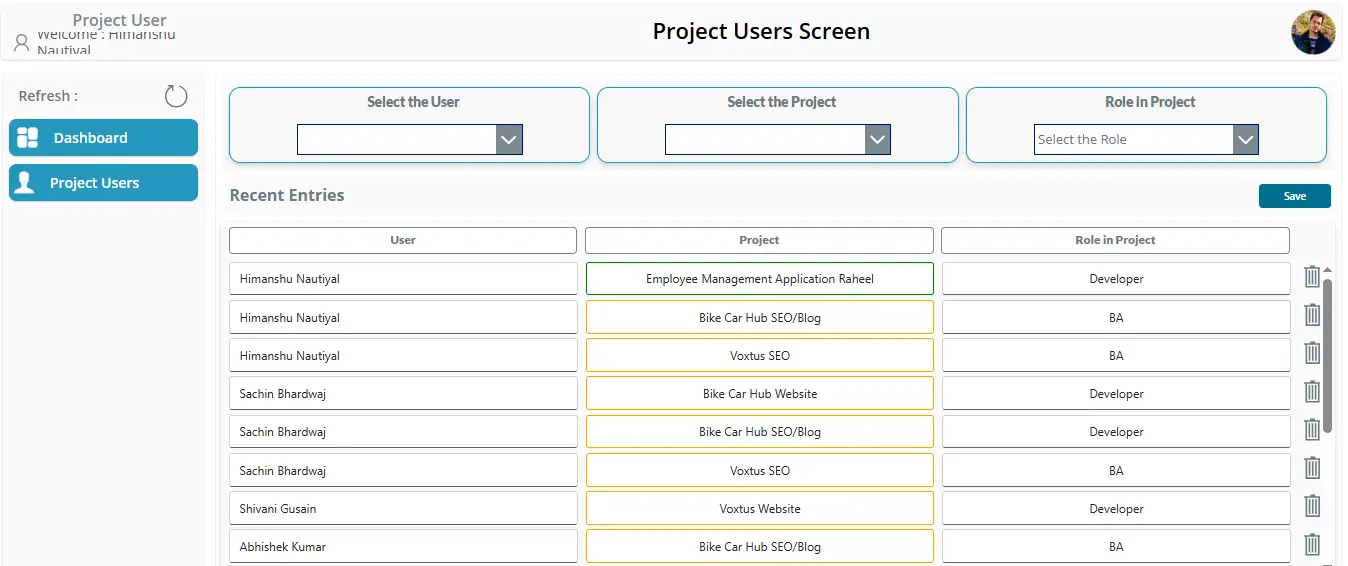
The Project Users Screen is used to map employees to projects.
Functionality
- Select User
- Select Project
- Assign Role in Project (Developer, BA, etc.)
- Save assignments to Dataverse
Benefits
- Controls which projects appear for each employee
- Ensures accurate project-wise time logging
- Enables role-based visibility and accountability
3. Project Screen (Admin Screen)
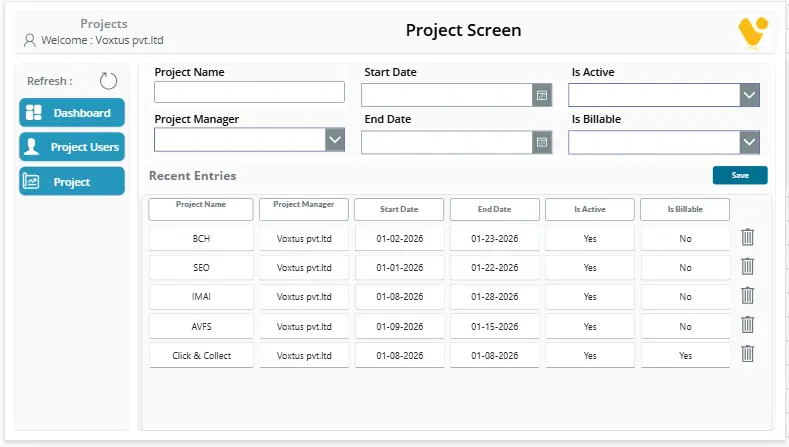
The Project Screen is an admin-only screen used to manage project master data.
Admin Capabilities
- Create new projects
- Define:
- Project Name
- Project Manager
- Start Date
- End Date
- Is Billable
- Is Active
- View recent project entries
- Update or deactivate projects as needed
Data Source & Architecture
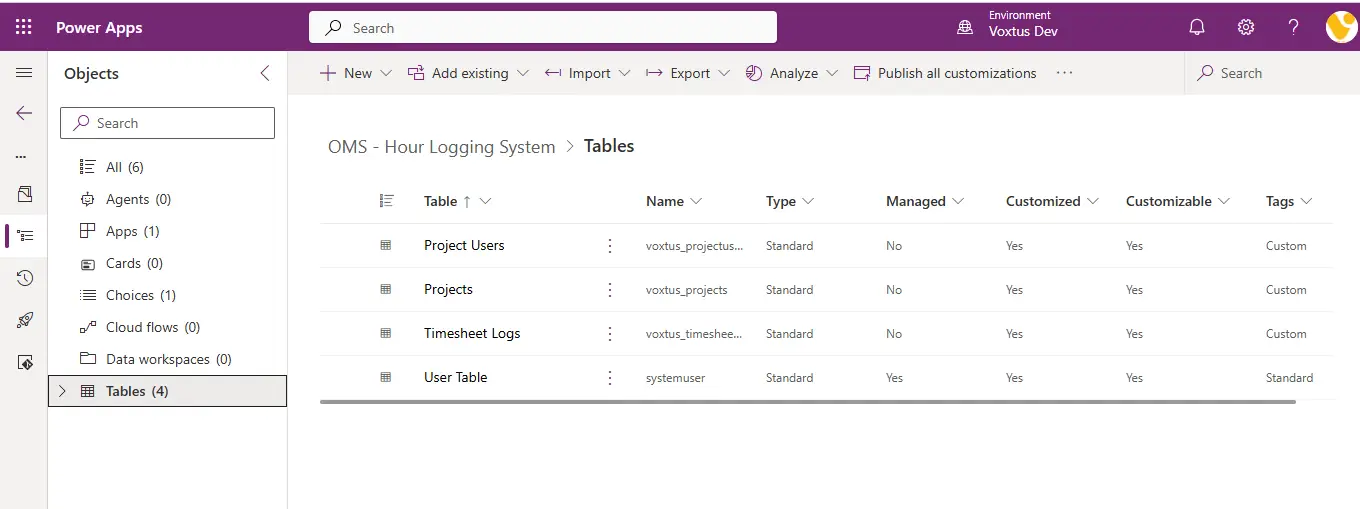
Backend: Microsoft Dataverse
The application uses Dataverse for structured and secure data storage.
Dataverse Tables Used
- Projects
- Stores project master data
-
Project Users
- Maps users to assigned projects and roles
-
Timesheet Logs
- Stores daily time entries
-
User Table
- Stores employee user information
Timesheet Logs Table Structure
| Column Name | Description |
|---|---|
| Employee | Lookup to User Table |
| Project | Lookup to Projects |
| Date | Date of work |
| Week Start | Week start date (Monday) |
| Day | Day name (Monday–Sunday) |
| Hours | Logged hours |
| Description | Task description |
- After applying the correct data type mapping, the dataflow refreshed successfully and the error was resolved.
Data Integrity & Validation
- No duplicate records for the same:
- Employee
- Project
- Date
- Day
- Existing entries are updated instead of re-created
- Only assigned projects can be logged
- Week-based filtering ensures clean data separation
Benefits of the Application
- Accurate weekly timesheet tracking
- Reduced manual errors
- Clear project-wise effort visibility
- Secure Dataverse-backed architecture
- Easy scalability for future enhancements
- Improved employee and admin productivity
Conclusion:
The
Timesheet Logs Application provides a robust and user-friendly solution for tracking employee working hours across multiple projects. By combining Power Apps, Dataverse, and a structured weekly workflow, the application ensures data accuracy, transparency, and efficient time management.
This solution is ideal for organizations looking to digitize timesheet management while maintaining strong data integrity and administrative control.
Contact Information:
- Email: info@voxtus.com
- Phone:+91-8630235507
Project information
Category: App Design
Project date: 1 January, 2026
Information Technology:
- Canvas App
- Microsoft Dataverse