
Alyant Pricing Tool
Overview
The Alyant Pricing Tool is an enterprise-grade pricing management solution designed to automate the ingestion, transformation, and management of large pricing datasets received from clients in Excel format. The solution ensures accurate, scalable, and auditable pricing data handling while enabling business users to review and manage pricing conditions through a Model-Driven Power App.
The project focuses on eliminating manual data handling, reducing errors, and ensuring seamless synchronization between Excel-based inputs and Dataverse-backed pricing data models.
Technologies Used:
- Microsoft Dataverse: Centralized data storage and pricing data model
- SharePoint Document Library: Source and archival storage for Excel files
- Power Automate: Workflow automation, data refresh, and record updates
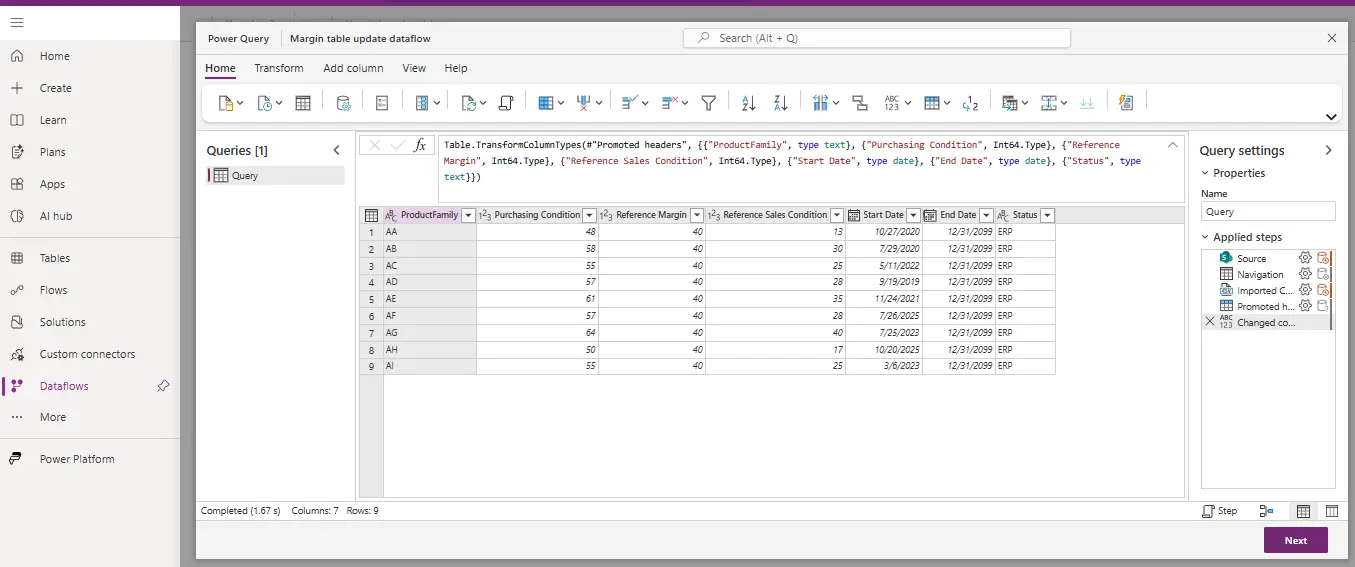
- Dataverse Dataflow: ETL process to load Excel data into Dataverse tables
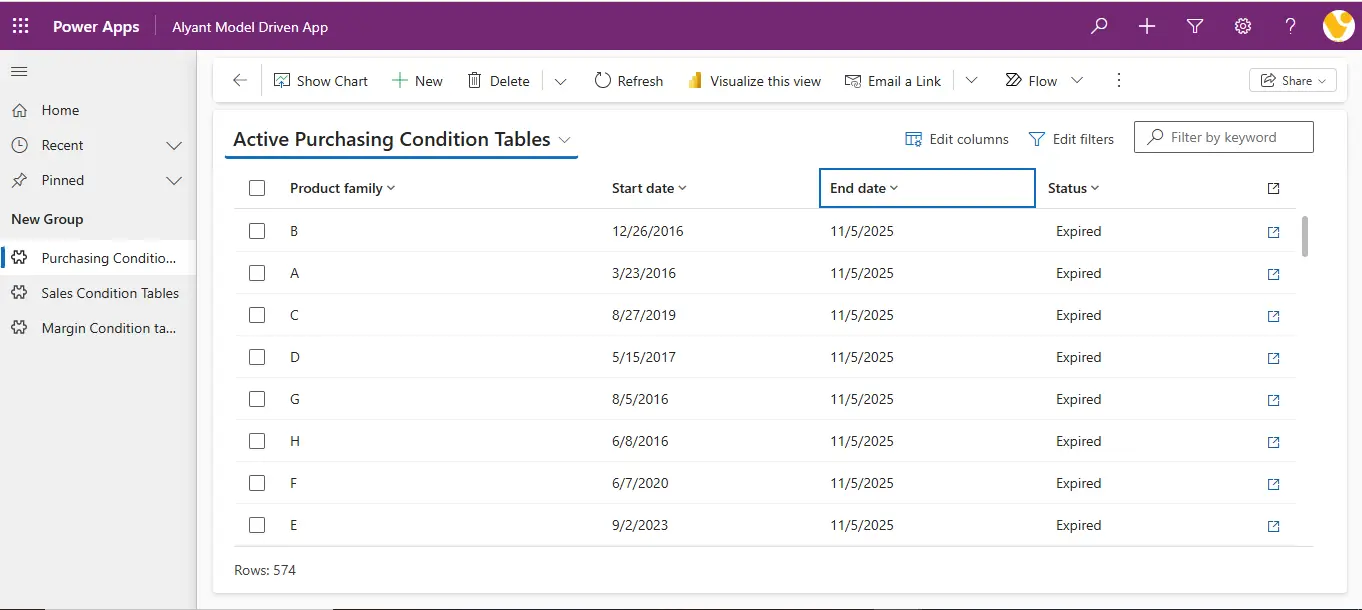
- Model-Driven Power App: User interface for data visualization and management
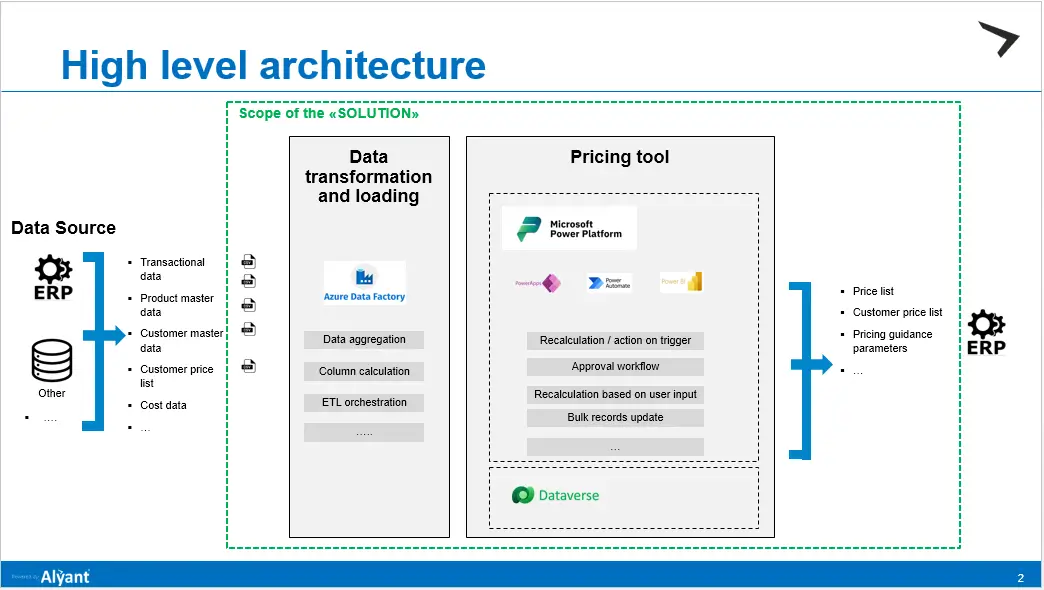
High-Level Architecture:
The Task Management Dashboard provides an overview of all tasks, categorized by status, system, target time, and completion time. The dashboard consists of:
- Client uploads pricing Excel files to a SharePoint Document Library.
- Power Automate Flow detects file upload.
- Dataverse Dataflow extracts and transforms Excel data.
- Data is loaded into Dataverse tables.
- Power Automate triggers dataflow refres.
- Processed Excel file is moved to an archive folder.
- Model-Driven App displays pricing data to end users.

Data Processing & Automation Flow:
Initial Data Load
- Client uploads an Excel file containing pricing-related data
- Power Automate flow is triggered on file creation
- Dataverse Dataflow connects to the SharePoint library
- Dataflow fetches and transforms Excel data
- Cleaned data is stored in Dataverse tables
- Uploaded file is moved to a processed folder for traceability
Incremental Updates & Change Handling
- If a client modifies any column in the Excel file:
- A second Power Automate flow is triggered
- Existing records in Dataverse are updated
- New records (if any) are inserted
- This ensures data consistency, version control, and up-to-date pricing information

Data Model Overview:
The solution is designed around a flexible pricing data model, including:
- Product Family Table
- Purchasing Conditions Table
- Margin Conditions Table
- Sales Conditions Table
Each table supports:
- Start Date & End Date validity
- Historical record tracking
- Controlled updates through Power Automate
Power App Functionality:
The Model-Driven Power App allows business users to:
- View pricing and condition data
- Track product family–level pricing rules
- Review historical and active pricing conditions
- Support bulk updates and recalculations triggered by automation
Error Handling & Resolution:
Dataflow Error Encountered
"There is a data type mismatch between the dataflow's source query column and the destination table column. The Dataverse table's purchasing condition column requires DecimalType data type but the dataflow contained Double data type that cannot be casted."
Root Cause
- Excel numeric columns were interpreted as Double type by default
- Dataverse destination column expected DecimalType
Solution Implemented
- Updated the Power Query step inside the Dataverse Dataflow
- Explicitly changed the column data type to:
Decimal.Type
- After applying the correct data type mapping, the dataflow refreshed successfully and the error was resolved.
Key Features:
- Automated Excel-to-Dataverse ETL pipeline
- Incremental updates without data loss
- Error-resistant dataflow design
- SharePoint-based audit and file traceability
- Scalable pricing data model
- Business-friendly Model-Driven UI
Conclusion:
The Alyant Pricing Tool delivers a robust, scalable, and automated pricing data management solution. By combining Dataverse, Power Automate, SharePoint, and Dataflows, the project eliminates manual intervention, ensures data accuracy, and provides a reliable interface for pricing stakeholders. The solution significantly improves operational efficiency and data governance in enterprise pricing workflows.
Contact Information:
- Email: info@voxtus.com
- Phone:+91-8630235507
Project information
Category: App Design
Client: Alyant
Project date: 24 December, 2025
Information Technology:
- Microsoft Dataverse
- SharePoint Document Library
- Power Automate
- Dataverse Dataflow
- Model-Driven App