
"Coauthoring in Power Apps: Real-Time Collaboration for App Development"
Introduction:
In today’s fast-paced digital world, collaboration has become the foundation of modern software development. Teams are no longer limited to working in isolation; instead, they build solutions together, in real time, from different locations and across different time zones. Microsoft Power Apps embraces this collaborative approach by introducing Coauthoring, a powerful feature that allows multiple makers to work on the same Canvas App simultaneously.
Coauthoring in Power Apps transforms app development into a shared experience. Instead of waiting for one developer to finish their changes before another can begin, multiple makers can now build, design, and improve an app at the same time. This significantly improves productivity, accelerates delivery, and promotes teamwork.
This blog provides a complete and in-depth understanding of Coauthoring in Power Apps, including how it works, how to enable it, its advantages, limitations, best practices, and real-world use cases.
What is Coauthoring in Power Apps?:
Coauthoring is a collaboration feature in Power Apps that allows multiple users to edit a Canvas App at the same time. When coauthoring is enabled, all makers can:
- Edit screens and controls simultaneously
- See each other’s changes in real time
- View where other makers are working
- Collaborate just like Google Docs or Microsoft Word online
This feature is designed for modern development teams where multiple people contribute to an application.
Coauthoring vs Copresence
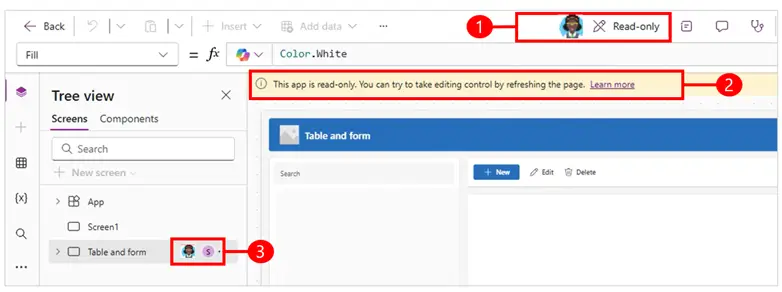
Before coauthoring was introduced, Power Apps supported a feature called Copresence.
Copresence
- Shows who else is viewing the app
- Only one person can edit at a time
- Others can only view in read-only mode
- The first person who opens the app gets editing control
Coauthoring
- Allows multiple makers to edit at the same time
- Shows live changes
- Highlights areas being edited
- Displays avatars of all collaborators
Key Difference
Feature |
Copresence |
Coauthoring |
|---|---|---|
| Multiple editors | No | Yes |
| Real-time updates | No | Yes |
| Read-only mode | Yes | No |
| Collaboration | Limited | Full |
| Modern teamwork | No | Yes |
Why Coauthoring is Important
Traditional app development often involves sequential work:
- One person designs UI
- Another writes logic
- Another tests
This creates delays and dependencies.
With coauthoring:
- Designers build UI while developers write formulas
- Testers validate screens while improvements are added
- Business users review in real time
This leads to:
- Faster development
- Better quality
- Stronger collaboration
- Reduced rework
How Coauthoring Works in Power Apps
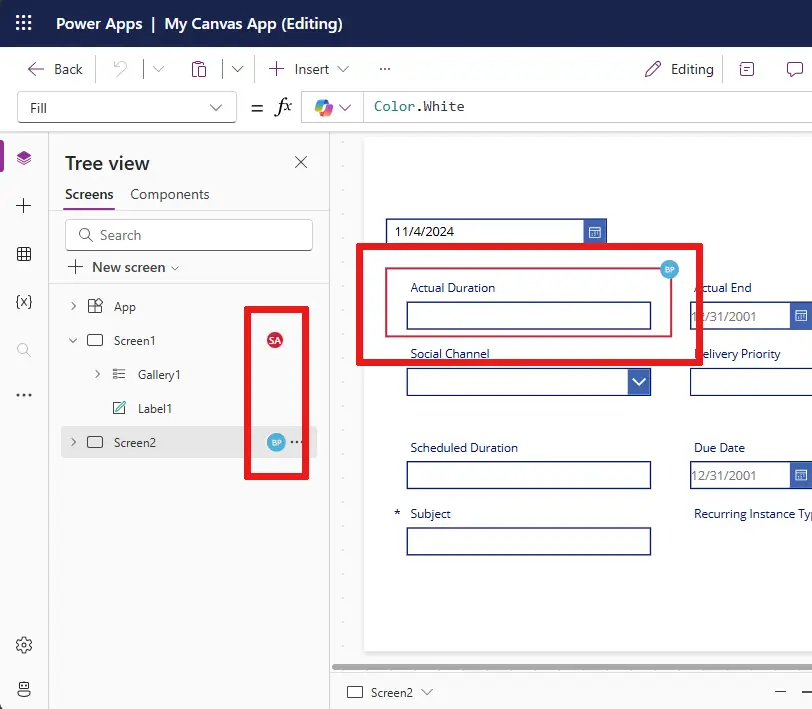
When multiple makers open the same app in Power Apps Studio:
- Each maker is assigned a profile avatar
- The left navigation tree shows who is editing which screen
- Controls being edited are highlighted with user initials
- Changes appear in real time for all collaborators
This creates a shared workspace where everyone can see what others are doing.
How to Enable Coauthoring in Power Apps
Coauthoring is disabled by default and must be enabled per app.
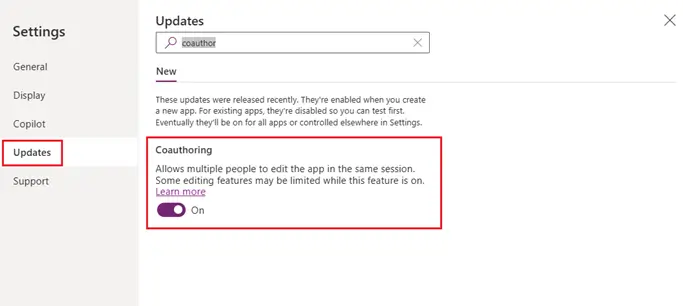
Steps to Enable Coauthoring
- Open your Canvas App in Power Apps Studio
- Click Settings
- Go to Updates
- Select the New tab
- Search for Coauthoring
- Turn ON the Coauthoring toggle
- Save and refresh the app
Once enabled, coauthoring overrides copresence.
Features of Coauthoring
Real-Time Editing
Multiple makers can edit the same app simultaneously and see updates instantly.
Visual Indicators
- Avatars of coauthors appear in the command bar
- Initials appear on controls being edited
- Screens are highlighted when someone is working on them
Tree View Collaboration
The left navigation pane shows:
- App structure
- Which screen each maker is editing
- Which control is being modified
Autosave Support
When autosave is enabled, changes are automatically saved.
Pros of Coauthoring in Power Apps
1. Faster Development
Multiple people working together reduces delivery time.
2. Better Collaboration
Designers, developers, and testers can work together live.
3. Improved Productivity
No waiting for another developer to finish.
4. Real-Time Feedback
Business users can review and suggest changes instantly.
5. Reduced Errors
Multiple eyes on the same app improve quality.
6. Modern Development Experience
Feels similar to collaborative tools like Google Docs.
Cons and Limitations of Coauthoring
While coauthoring is powerful, it has some limitations.
Functional Limitations
When coauthoring is enabled, the following features are disabled:
- Search
- Save As
- Open another app
- Undo / Redo
- Switch authoring versions
- Cut operation
Technical Limitations
- Maximum of 10 coauthors at a time
- App language is locked to the first maker’s locale
- Monitor tool does not support coauthoring
- Renaming controls may cause conflicts
- Copy-paste can create issues
- AI Builder components have limitations
- Geospatial controls may not work properly
Risk of Overwriting Changes
If two users edit the same control at the same time, one may overwrite the other’s changes.
Best Practices for Using Coauthoring
1. Assign Responsibilities
Each maker should work on separate screens or modules.
2. Communicate Clearly
Use Teams or meetings to coordinate work.
3. Avoid Editing Same Controls
Divide work areas clearly.
4. Refresh Before Testing
Always refresh the app after others save changes.
5. Enable Autosave
Prevents accidental data loss.
6. Use Version Control
Export app backups regularly.
Real-World Use Cases
HR Application Development
HR and IT teams build employee management apps together.
Finance Automation
Accountants and developers collaborate on expense tracking apps.
Field Service Apps
Operations teams build mobile apps together.
Education Apps
Teachers and IT teams design learning platforms.
Healthcare Apps
Doctors and developers build patient tracking systems.
When Should You Use Coauthoring?
Coauthoring is ideal when:
- You have a team of developers
- You need fast delivery
- Business users are involved
- App is complex
- Continuous improvements are required
Avoid coauthoring when:
- You are working alone
- You need heavy testing
- You rely on undo/redo frequently
Security and Governance
Power Apps coauthoring follows Microsoft security standards:
- Access controlled via Microsoft Entra ID
- Only authorized users can edit
- SharePoint and Dataverse permissions enforced
- Activity tracked in audit logs
Admins can:
- Control app sharing
- Restrict environment access
- Monitor maker activity
Future of Coauthoring in Power Platform
Microsoft continues to improve collaboration features:
- Better conflict handling
- Improved undo/redo
- GitHub integration
- Advanced version control
- AI-powered suggestions
Coauthoring is a major step towards enterprise-grade low-code development.
Conclusion
Coauthoring in Power Apps is a revolutionary feature that brings real-time collaboration to low-code app development. It empowers teams to work together seamlessly, reduces development time, and improves solution quality.
By enabling coauthoring, organizations can adopt modern development practices while still benefiting from the simplicity of Power Apps. Whether you are building HR systems, finance tools, or enterprise automation, coauthoring helps teams move faster and smarter.
Power Apps is no longer just a low-code platform — it is a collaborative development ecosystem.
If you have any doubts or questions related to this blog, you can Contact us by Email: info@voxtus.com
Himanshu Nautiyal
Power Apps Consultant
Power Apps Related Posts
